Bitten By Lion
by Matt CholickI was due for a new machine at work and I chose an iMac this round. I expected a pretty smooth transition as I've been using a MacBook for a while now. What I didn't anticipate, though, was Lion. It's not as if OS X 10.7 is a totally different operating system. It is, though, really different with respect to probably my favorite feature of 10.6: Spaces. Spaces was the one feature of OSX that I could point to and say "This works better than it does in any other operating system." I'm sad that's no longer true.
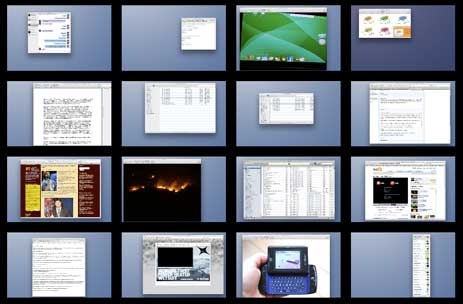
Spaces in 10.6
One amazing feature was the ability to drag windows across the various spaces. This made changing and rearranging work spaces both fast and easy. Zooming out to the large grid allowed me to easily identify a particular work space. The 4 rows allowed me to organize various contexts - row three could hold a set of work spaces for one project while row four could hold spaces for a second.
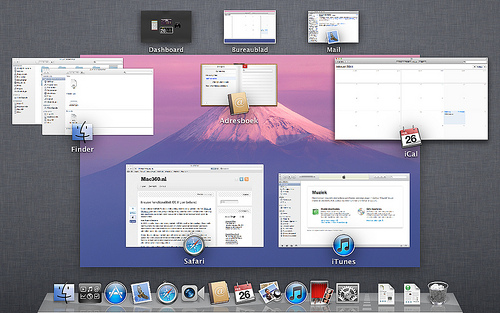
Spaces in 10.7
All of this disappeared in Lion. The ability to zoom out and see all the spaces no longer works; the set of spaces no longer take the full screen and instead are forced into a single small row. This new model doesn't support 16 spaces, even on a 27" monitor, because the contents are just too small. The ability to drag windows across the small version of the spaces is also no longer present.
While it might seem like a small thing, the old version of spaces was the operating system level feature that I loved the most. This is really frustrating; Spaces was core to my workflow. What they had in 10.6 was both perfect for me and a thing I used very heavily. I'm really going to miss it.